


 12-minute read
  Listen to article
What headquarters decides and what the customer finds in the aisle do not always match. That distance is what planogram compliance measures.
Behind every shelf, there are weeks of work: sales analysis, supplier negotiations, and decisions about which brand earns the customer’s eye and which one ends up near the floor. In many cases, someone has also paid for that spot.
Then comes what happens in every store, every day. A truck arrives, a promotion starts, the shift team rotates, and someone rearranges products to deal with whatever is urgent. So, a few days later, the shelf in the planogram and the shelf the customer sees are two different things.
Because execution changes daily, that gap is hard to catch in time at every store. That is why this article covers how to check a planogram from start to finish, what it costs to skip that check, what gets measured on each fixture, and which criteria help evaluate a solution.
In this article
- What planogram compliance is
- Where planogram compliance gets lost between headquarters and the store
- What a complete planogram validation should check
- Why planogram compliance is measured too late
- The cost of not validating the planogram
- The five stages of planogram compliance
- Frogmi’s AI planogram compliance
- What a complete platform adds to planogram compliance
- What each team gains from verifiable planogram compliance
- Criteria for evaluating a planogram compliance solution
- From the plan to the shelf
- Frequently asked questions about planogram compliance
What planogram compliance is
Definition. Planogram compliance is the degree to which a real shelf matches the current planogram: the right products, in the defined position, shelf level, and number of facings. It also covers respect for the trade agreements with each brand in the assigned space.
A planogram brings together category decisions: which products are sold, how much space each one gets, and where it sits. When a supplier agreement exists, it also serves as the document that backs that space. For this reason, checking planogram compliance matters to two teams at once: those who design and optimize space, and those who negotiate with brands.
A fixture can look flawless yet still hold products outside the position defined by the planogram. That is why a planogram compliance check compares each position with the current plan and ignores the general impression of order. This way, the conversation with each brand rests on what is actually on the shelf.
Where planogram compliance gets lost between headquarters and the store
A planogram passes through many hands before it reaches the shelf. Someone designs it, someone negotiates the space, someone publishes it, the store implements it, and someone reviews it. Information can get lost at every handoff. These are the points where it happens most often:
- The delivery. The file travels by email, and nobody knows for sure whether the store received it or from what date it applies.
- The implementation. The store works from a printed sheet that becomes obsolete after the first update.
- The review. A supervisor checks the fixture on the next visit, and each reviewer applies their own standard.
- The evidence. Conversations with suppliers about contracted space arrive without any factual confirmation.
These frictions come from the design of the process. The store team responds with the time and information it has. Besides, a planogram change competes with customer service, restocking, and other tasks for the rest of the shift.
What a complete planogram validation should check
Checking a planogram means looking beyond whether a product is simply there. That is why a complete validation verifies these elements for every section of the shelf:
- Product position on the fixture, the shelf level, and the section.
- Number of facings assigned to each product or brand.
- Shelf labels and point-of-purchase (POP) materials that belong to the fixture.
- Products from other brands, or neighboring items, sitting in space that is not theirs.
- Planogram version implemented at the store.
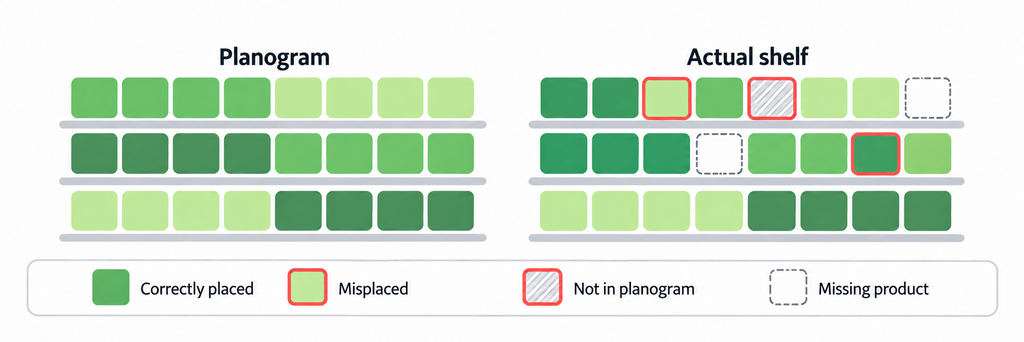
When AI compares the fixture photo with the current planogram, each product is assigned to one of four categories. This classification organizes the conversation between the commercial team and the stores:
- Correct. The product defined in the planogram is in its position and on its shelf level.
- Out of position. The right product is on the fixture, but shifted from its place. The fix is to move it to its position.
- Unauthorized. A brand that does not belong in the planogram occupies a facing meant for another. For anyone negotiating space, this is the most sensitive signal.
- Out of stock. The position is empty or lacks the corresponding product. The focus here is space: an empty facing is also a facing that does not meet the plan.
Why planogram compliance is measured too late
The traditional check depends on a visit: someone walks the fixture with the planogram in hand, compares it visually, and records the result on a spreadsheet. Retailers invest resources to measure and validate planogram compliance in their stores, yet still do not always complete it on time. This method, in place for years, has three structural limits:
- Only some stores get audited, and the rest are assumed to look the same.
- Each reviewer applies a different standard: what passes for one fails for another.
- Planogram compliance reports arrive late.
As a result, commercial decisions may rest on information that is incomplete, outdated, and hard to compare. In addition, every store format has its own fixtures and versions, which multiplies the review workload.
The cost of not validating the planogram
When planogram compliance is not verified often, the cost shows up on several fronts at once:
- Out-of-stock positions that leave empty space. A position without product is an assigned facing that is not performing.
- Products out of position that break the fixture’s logic. Customers no longer find each product where they expect it, and the category design loses its effect.
- Facings that differ from the defined ones, which reduce visibility. Every missing facing takes presence away from the brand and lowers its real share of shelf.
- Unauthorized products that take another brand’s space. A facing that was already agreed is used by a brand that did not negotiate it.
- Display materials that are not installed or are installed incorrectly. A promotion that was not displayed as planned gets evaluated with results that do not reflect what was designed.
Each of these deviations affects revenue and trade agreements. Without frequent checks, and without the same standard in every store, most of them go unnoticed between one visit and the next. Learn more about accurate planogram execution and its impact on sales.
A less visible cost follows. If a supplier agreed on position, facings, or display, the retailer should be able to show it delivered, and the supplier should be able to verify it. Without evidence, every commercial meeting turns into a debate about perceptions. And when compliance varies from one store to another, the same planogram can produce very different results, which may only become apparent on the bottom line.
The five stages of planogram compliance
A complete planogram compliance process covers five connected stages. If one fails, the others lose value, because each one feeds the next.
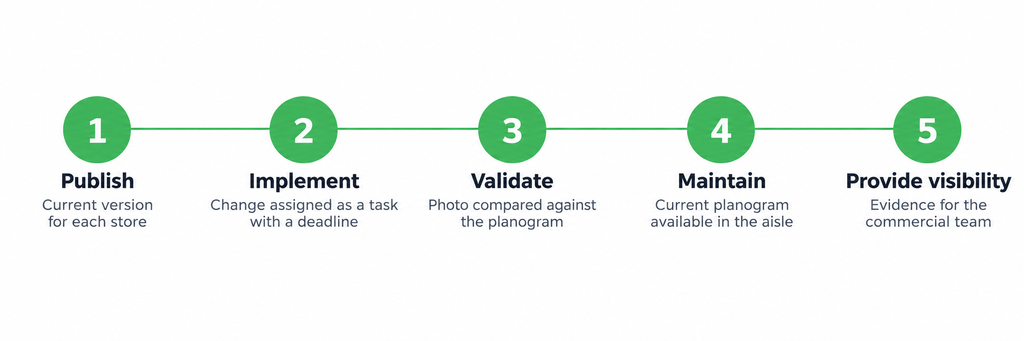
1. Publish: a current version for every store
It starts with uploading the updated planograms and sending them to each store with an effective date. Each store receives the change that applies to it and confirms receipt, so that headquarters knows which version each store has.
2. Implement: the change as a task with a due date
The change reaches each store as a specific task, based on its format and fixtures, with what goes in, what comes out, and what moves. This way, the sales floor team knows what to do without having to interpret a general file.
3. Validate with AI: the photo against the planogram
Once the change is implemented, the team takes one photo per section. The AI recognizes each product, compares it to the current planogram one by one, and returns the classification: Correct, Out of position, Unauthorized, or Out of stock. As a result, the review no longer depends on who visits the store.
4. Maintain: the current plan within reach in the aisle
A planogram drifts with daily restocking. So to hold it in place, each fixture has a QR code that opens the current version of that section in that specific store.
5. Make visible: evidence for the commercial team and for suppliers
Findings, grouped by product and store format, are shared with the commercial team to prioritize. Compliance with the contracted space becomes visible to each brand, backed by the photo.
Frogmi’s AI planogram compliance
With this launch, Frogmi’s AI planogram compliance joins the in-store execution platform. It covers the five stages of planogram compliance described above, from publishing to visibility, in the same platform. In many operations, the shelf photo already exists. The missing piece is reading it.
The flow is short. First, the employee takes a photo of the fixture in the Frogmi app. Then the AI identifies each product and checks it against the current planogram. Finally, the finding reaches the team ready to fix, with the position, date, and store marked.
Two features make the difference. First, every store is measured with the same standard, no matter who is looking. Second, every result traces back to the photo: if someone disputes it, the image opens and settles it. More about Frogmi’s AI planogram compliance.
It also works with the catalog that already exists in your operation. It does not require completing a product master before getting started, which speeds up the launch and the analysis of your shelves.
What a complete platform adds to planogram compliance
Validating with a photo solves half of the planogram compliance problem. The other half happens before and after: the store needs the right planogram at hand, and it needs to carry out the change product by product. Frogmi covers both on one platform.
Document manager: the current planogram in the aisle
Each planogram document or folder has its own QR code. In the aisle, one scan opens the current version of that fixture, with secure access and permissions by role, area, and store. When the planogram changes, nobody reprints anything, because the same QR points to the new version. Learn about Frogmi’s document manager.
Product-level execution: from the change to the confirmation
Each planogram update becomes a task for each specific store. The store marks it as done or reports what happened, for example, not enough space on the fixture or a product out of stock. This way, headquarters can tell a store that did not execute from a store that could not execute, and it knows where the rollout stands.
In the store, the team scans a product’s barcode and sees its aisle, fixture, section, shelf level, and number of facings, without searching the planogram. Learn about product-level execution.
What each team gains from verifiable planogram compliance
One photo serves two conversations.
For the commercial team
The team receives the non-compliance findings the AI detects, grouped by product and store format, ready for prioritization. It sees each brand’s share of shelf, meaning what portion of the shelf the brand actually occupies, facing by facing and shelf level by shelf level. It also spots unauthorized products, neighboring products, and POP materials that do not belong on the fixture, without waiting for a manual report.
For suppliers
Suppliers see planogram compliance for the contracted space by brand, backed by photo evidence. Every finding includes the marked position, the date, and the store. This way, the discussion about a space agreement rests on the image, location, and date.
Criteria for evaluating a planogram compliance solution
When comparing planogram compliance solutions, these questions separate a tool that only reads a photo from one that supports the whole process:
- Does it compare against the current planogram of each store and each format?
- Does it recognize individual products and tell apart those that are out of position, unauthorized, or out of stock?
- Does it cover publishing, implementation, and maintenance, in addition to validation?
- Does it deliver evidence with position, date, and store that works in a conversation with suppliers?
- Can it be implemented quickly and simply, without a special data collection effort?
- Does it keep the current planogram within the store’s reach without having to reprint?
From the plan to the shelf
A well-designed, well-negotiated planogram loses value if no one can confirm it is being followed. Any commercial team should be able to answer three questions about its network. How close is each store to what was designed? Where is the gap, and what causes it? Which correction would have the most effect?
Answering them requires seeing every shelf with the same standard and on time. That happens when publishing, implementing, validating, maintaining, and making visible all live in one process. The team knows which stores and shelf levels need attention first, corrects in time, and walks into each supplier meeting with evidence. Frogmi connects those five stages, so that what headquarters decides is what the customer finds in the aisle. Schedule a demo of Frogmi’s AI planogram compliance.
Frequently asked questions about planogram compliance
What is planogram compliance?
It measures how closely a real shelf follows the current planogram: correct products, in the right position, on the right shelf level, with the right number of facings. It also includes the trade agreements for each brand.
How is a planogram audited in the store?
Traditionally, a person walks the fixture with the planogram and compares it by eye. A more consistent way to audit planogram compliance takes one photo per section and compares it with AI against the current planogram, so every fixture is measured with the same standard.
What is the difference between a planogram and a trade agreement on space?
The planogram defines how the fixture should look: products, positions, and facings. The trade agreement defines the space that a brand negotiates with the retailer. The planogram is usually the document that translates that agreement onto the shelf, so checking one also means checking the other.
How does AI validate that a shelf matches the planogram?
It takes the photo of the section, recognizes each product, and compares it position by position against that store’s current planogram. The AI classifies each product as Correct, Out of position, Unauthorized, or Out of stock, and the finding keeps its position, date, and store.
What does it cost not to validate the planogram?
The main costs of poor planogram compliance are missing products in assigned positions, products out of place, facings that differ from the defined ones, other brands on agreed space, and display materials that were not installed as planned. In addition, without evidence, every conversation with a supplier about contracted space stays in the realm of perceptions.
What information is needed to get started?
Frogmi works with the existing catalog in the operation, without completing a product master before starting. The team uploads the planograms to the platform and sends them to each store.


